
 mgifos
76603dcf5d
mgifos
76603dcf5d
|
7 years ago | |
|---|---|---|
| images | 8 years ago | |
| project | 7 years ago | |
| src | 7 years ago | |
| .gitignore | 8 years ago | |
| .scalafmt.conf | 7 years ago | |
| LICENSE | 8 years ago | |
| README.md | 7 years ago | |
| build.sbt | 8 years ago | |
| version.sbt | 7 years ago | |
README.md
Quick plan
is a command line tool to define, import, schedule and share GarminConnect workouts i.e. weekly based training plans.
An example of a workout definition notation:
running: 15k, 3x3.2k @HMP
- warmup: 2km @z2
- repeat: 3
  - run: 3200m @ 5:05-4:50
  - recover: 800m @z2
- run: 1km @z2
- cooldown: lap-button
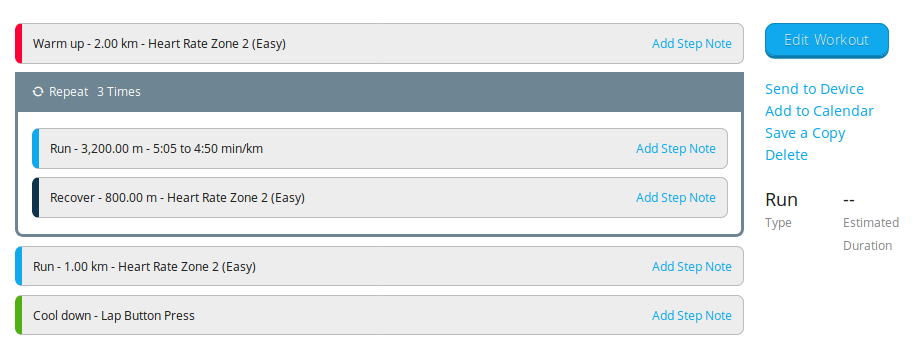
and the tool's job is actually to translate it to this:
File format
The file format is a spreadsheet exported to csv format. The 1st row is reserved for heading, can be anything (you define your first day of a week etc.). The 1st column is reserved for a week number. The cells represent days and they are populated with workouts (definitions and references), so there's a limitation: a single workout per day/cell, for now. In case of the references, a workout needs to be defined first in one of the previous cells and then it can be referenced by name in the following cells.
An example of 2-weeks training plan, containing 2 workout definitions, 4 references and 6 training days in total:
| Week | Mon | Tue | Wed | Thu | Fri | Sat | Sun |
|---|---|---|---|---|---|---|---|
| 1 | running: run-fast- warmup: 10:00 @ z2- repeat: 3- run: 1.5km @ 5:10-4:40- recover: 500m @ z2- cooldown: 05:00 |
rest | rest | run-fast | rest | rest | rest |
| 2 | run-fast | cycling: cycle-wo - bike: 15 km @ 20.0-30kph |
rest | run-fast | rest | rest | cycle-wo |
Checkout a complete training plan for 80K ultra. It was originally published in an article on Runner's world website - here's the link.
Installation
- Java 8 is a prerequisite, make sure you have it installed
- Go to the releases page of this project
- Download latest release zip file and unzip it somewhere on your computer
- Enter bin folder and run
quick-plancommand (usequick-plan.batif you are a Windows user or mark quick-plan script as executable on Linux or Mac systems)
Command line options
quick-plan --help

quick-plan 0.x

Usage: quick-plan [import|schedule] [options] <file>

  -e, --email <value>      E-mail to login to Garmin Connect
  -p, --password <value>   Password to login to Garmin Connect
  -m, --measurement_system <value>
                           "metric" (default) or "imperial" (miles, inches, ...) measurement system choice.
  -x, --delete             Delete all existing workouts with same names as the ones that are going to be imported.
  --help                   prints this usage text

  <file>                   File with a weekly based plan in CSV format


Command: import
Imports all workout definitions from CSV file. If it's omitted, it is will be on by default.
Command: schedule [options]
Schedules your weekly plan defined in CSV in Garmin Connect calendar, starting from the first day of first week or ending on the last day of the last week. Either start or end date must be entered so the scheduling can be done properly. In case both are entered, start date has priority. All dates have to be entered in ISO date format e.g. '2018-03-24'.

  -s, --start <value>      Date of the first day of the first week of the plan
  -n, --end <value>        Date of the last day of the last week of the plan

EXAMPLES

Schedules ultra 80k plan targeting 28-4-2018 for a race day

quick-plan schedule -n 2018-04-29 -x -e your-mail-address@example.com ultra-80k-runnersworld.csv
Workout notation
The reserved keywords of the notation are: workout, warmup, cooldown, run, bike, go, repeat, recover and lap-button.
<workout> := <header><step>+
<header> := <sport>: <name>
<sport> := (running | cycling | custom)
<name> := [\u0020-\u007F]+ (printable ascii characters)
<step> := <newline>- <step-def>
<step-def> := <simple-step> | <repetition-step>
<simple-step> := (warmup | cooldown | run | bike | go | recover): <duration> [@ <target>]
<repetition-step> := repeat: <count>(<newline> - <simple-step>)+
<duration> := <distance-duration> | <time-duration> | lap-button
<distance-duration> := <number> (km | m | mi)
<time-duration> := <minutes>:<seconds>
<target> := <zone-target> | <pace-target> | <hr-target>
<zone-target> := z[1-6]
<pace-target> := <pace> - <pace> (mpk | mpm)?
<hr-target> := \d{1,3} - \d{1,3} bpm
<speed-target> := <kph-speed> - <kph-speed> (kph | mph)?
<pace> := <minutes>:<seconds>
<kph-speed> := \d{1,3}(\.\d)?
<minutes> := \d{1,3}
<seconds> := \d{2}
<newline> := [\r\n]
Unit of measurements (metric vs imperial)
As Garmin supports metric and imperial measurement systems, quick-plan can do this as well. There are two ways of usage:
- implicit (through the tool configuration (see the option -m) or
- explicit (it can be specified within the workout definition by using units:
- km vs mi (for distance),
- kph vs mph (for speed) and
- mpk vs mpm (for pace).
If not specified -m value from configuration will be used ('metric' by default).
Known issues
- It is highly recommended to use Google Spreadsheets or LibreOffice Calc to edit CSV files, as they both force line-feed (LF) instead of carriage-return (CR) character for internal line breaks when defining workouts. The parser we use is not able to parse CR values within the quoted values at the moment.